Docs
Workflows
Stage-based approvals and pipelines: stages, transitions, assignees, guards, SLAs, parallel gateways, simulation and publishing.
Workflows are Workcraft's stage-based engine for human processes — approvals, reviews, pipelines. Unlike flows (pure automation), workflows assign work to people: each record moves through stages, and the right people get tasks at each step. The server owns all state; the UI shows what you can do.
Mental model
- Workflow — a definition: stages + transitions + trigger, bound to one or more form pages.
- Instance — one record's live journey through the workflow.
- Stage — a step (Draft, Manager Review, Approved…). Terminal stages are type
end. - Transition — an arrow between stages with a label ("Approve"), optional guards, and Before/During/After hooks.
- Task — what an assignee sees in My Tasks for the current stage.
The builder
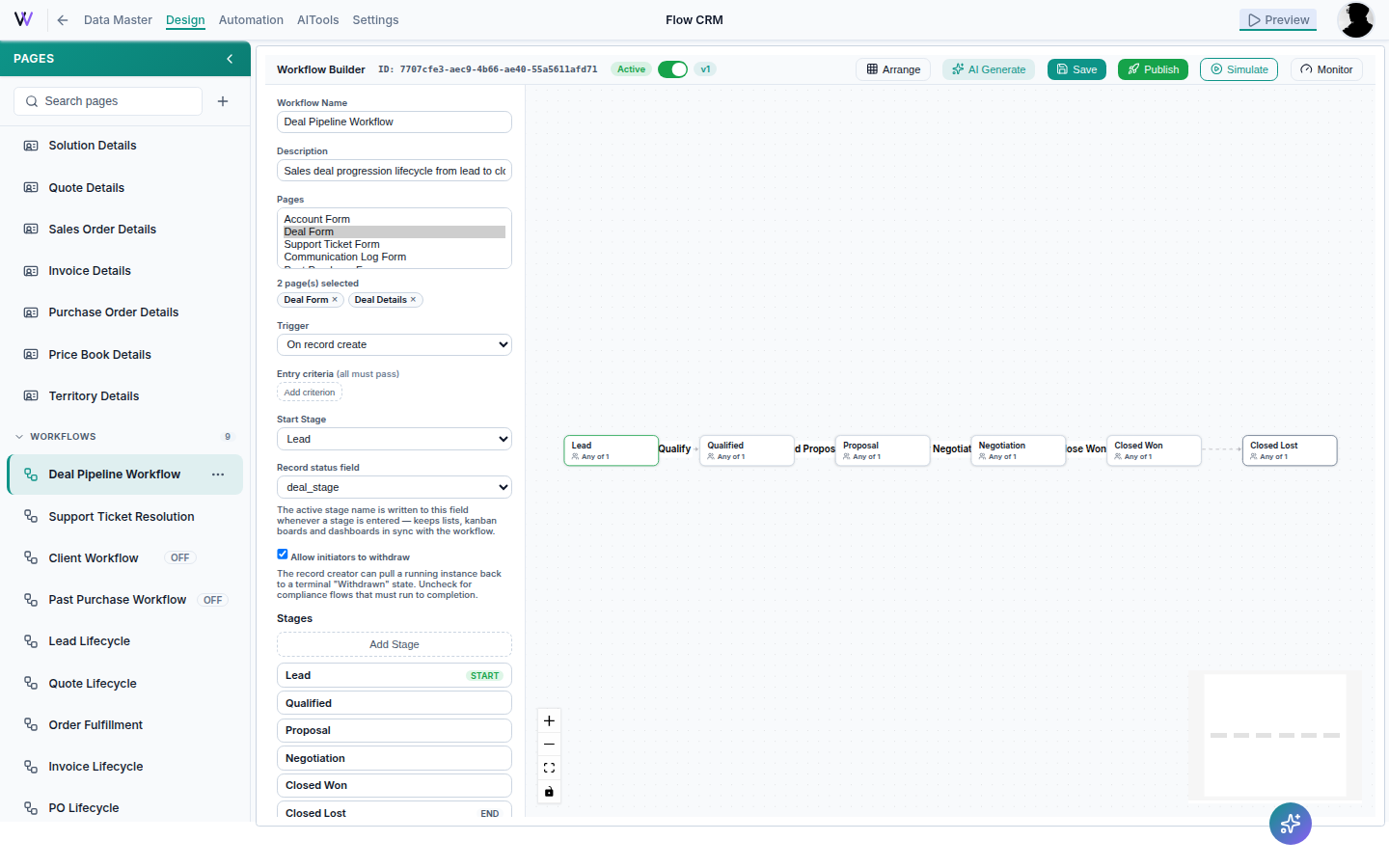
Workflows → Create/Edit opens a canvas: left panel (name, description, pages, trigger, start stage, stage list), canvas (stages as nodes, transitions as edges), inspector (click a node or edge to edit it). Toolbar: AI Generate, Save, Publish, Simulate, Monitor.
Stages
Add stages, name them, set the type (stage, end, parallel_split, parallel_join), drag to arrange, pick the start stage. On each stage configure:
- Assignees — who gets the task: explicit users, app roles, a record field holding a user (
fieldRef), or the record creator. Modes:ANY_ONE(first responder wins),ALL(everyone must act; first reject wins),SEQUENTIAL(fixed order),PERCENT(quorum %). - SLA — duration + unit → task due date. Optional reminder flow, escalation flow, and auto-move to another stage on breach.
workingHourscounts business time only. - Actions — flows on stage entry/exit, and field updates applied to the record on entry.
- Field permissions — per-field readonly/hidden/required while the stage is active (server-enforced).
- Record lock — block all user edits while this stage is active.
Transitions (edges)
Drag from a stage's right-edge handle onto another stage. Click the edge to configure:
| Setting | What it does |
|---|---|
| Label | Button text on the record page ("Approve", "Send back") |
| Decision | neutral/approve/reject — drives quorum and first-reject behavior |
| Guards (conditions) | Field/operator/value rows that must all pass — operators include ==, !=, >, <, in, contains, changed, empty |
| Who can perform | Optional role/user override; empty = stage assignees |
| During | Require comment, require fields, guidance message in the action dialog |
| After | Run a flow, send a notification flow, apply field updates |
Triggers
- On record create — auto-starts when a record is created through a bound form. Optional entry criteria (guards) restrict which records qualify.
- On record update — auto-starts on update; use the
changedguard to react to specific fields. One instance per record by default. - Manual — started explicitly when the record page opens (idempotent).
Bind the workflow to pages in the left panel — that's which forms' records it governs.
The status field
Set Record status field to a status-like field on the bound form: the engine writes the active stage name into it on every stage entry, keeping lists, kanban boards and dashboards in sync with workflow state. Lookup-backed fields get missing stage names added automatically.
Runtime: tasks and My Tasks
- Each stage entry creates tasks for the resolved assignees; they appear in the user's My Tasks inbox (menu badge = pending count).
- Available transitions show as buttons on the record page; guards, comments and required fields are enforced server-side.
- Activity — every record shows a timeline: stage entries, transitions, task assignments/completions, SLA events, admin actions.
- Out-of-office delegation — users can delegate a task or set a date-bounded OOO rule so a delegate can act for them.
- Initiator withdraw — the person who started a workflow can withdraw their own submission from the record page (Withdraw submission) while it's still in progress. An optional reason (up to 500 characters) is recorded on the timeline and audit log; the record then shows Withdrawn and can't be restarted — an admin must start a new instance if needed. The button is hidden or disabled when the record is locked or the instance isn't in a withdrawable state.
SLA and escalation
A stage SLA produces a task due date. A background scanner (about once a minute) finds overdue tasks: fires the reminder flow once per task, and on stage breach fires the escalation flow then system-moves the instance to the configured stage — once per stage per instance, and only on the breached branch for parallel workflows.
Parallel gateways
- Parallel split (fork) — every guard-passing outgoing branch activates at once.
- Parallel join — waits until all inbound branches arrive, then proceeds.
- An instance completes only when no branch is active and no join is half-arrived. SLA and admin actions operate per branch.
Simulation
Simulate dry-runs the published definition against sample JSON — no data is written. Step through transitions, watch the trace (stage entries, guard blocks, join waits), and verify field updates before publishing.
Publish and versioning
- Save stores a draft; Publish snapshots an immutable version.
- Running instances stay pinned to the version they started on; new instances use the latest published version.
- Edits after publish show an Unpublished changes badge until you publish again.
Admin console (Monitor)
Designers and admins get a monitor view: instance list with status/stage/overdue filters, per-stage funnel with dwell times, and actions to force-move, cancel, reassign tasks, or migrate an instance to the latest version. Account admins can also act on any task (recorded as acting for the assignee).
Quick recipe — approval workflow
- Add stages:
Draft→Manager Review→Approved(end) andRejected(end). - Edges: Draft→Review "Submit"; Review→Approved "Approve" (decision approve, require comment); Review→Rejected "Reject" (decision reject, require comment); Rejected→Draft "Send back".
- On Review: assignees ANY_ONE with your approver role/users; optional SLA.
- Left panel: bind the form page, trigger "On record create", start stage Draft.
- Save → Publish → create a record: the instance auto-starts and Submit appears.
For automation-driven steps (notifications, field writes, integrations), wire flows into stage actions and transition after-hooks — see Automation flows. A workflow flow node can also advance a record programmatically.