Docs
Plans & limits
What each Workcraft Cloud plan includes: users, apps, workflows, connections, schedules, AI quota and gated features.
Workcraft Cloud plans set how much you can build and which features unlock. Limits are enforced at creation time — hitting a cap blocks the action until you upgrade or free space. Self-hosted deployments aren't plan-limited.
Plans at a glance
| Free | Starter | Pro | Enterprise | |
|---|---|---|---|---|
| Users | 5 | 25 | 100 | Unlimited |
| Apps | 2 | 10 | 50 | Unlimited |
| Workflows per app | 5 | 25 | 100 | Unlimited |
| Automation flows per app | 10 | 50 | 200 | Unlimited |
| Managed connections | 3 | 15 | 100 | Unlimited |
| Schedules (flows + imports) | 2 | 25 | 100 | Unlimited |
| AI generations / month | 25 | 250 | 2,000 | Unlimited |
Users, apps, connections, schedules and AI generations are counted across the whole workspace; workflows and automation flows are counted per app. These are the standard plan quotas — custom enterprise licensing can adjust them per workspace. Check your workspace's plan page or ask your admin. Limits of -1 mean unlimited.
Feature gates by plan
Features unlock cumulatively as you move up tiers:
| Feature | Free | Starter | Pro | Enterprise |
|---|---|---|---|---|
| AI app generation | ✓ | ✓ | ✓ | ✓ |
| Slack / Teams channels | — | ✓ | ✓ | ✓ |
| Locales (translations) | — | ✓ | ✓ | ✓ |
| Schedules (flows + imports) | — | ✓ | ✓ | ✓ |
| Enterprise connectors | — | — | ✓ | ✓ |
| Inbound channel webhooks | — | — | ✓ | ✓ |
| Workflow SLA / advanced (parallel, quorum, field permissions, record lock) | — | — | ✓ | ✓ |
| Environments | — | — | ✓ | ✓ |
| App version control | — | — | ✓ | ✓ |
| Audit logs | — | — | ✓ | ✓ |
| AI nodes / RAG | — | — | ✓ | ✓ |
| Branding (login page, appearance) | — | — | ✓ | ✓ |
| SSO / SAML / SCIM | — | — | — | ✓ |
How limits are enforced
- Counted resources — users, apps, workflows, connections, schedules, AI generations per month. Creating beyond the cap returns a plan-limit error.
- Gated features — saving the setting or running the action that needs the feature is blocked with a feature-not-available error until the plan includes it.
- Fail-open — unknown or missing tenant context doesn't block actions; enforcement only applies to known tenants.
- Custom deals — Enterprise arrangements can grant or revoke individual features and adjust limits per tenant.
Checking usage and entitlements
Any signed-in user can open the About dialog from the profile menu (top-right avatar → About): it shows the workspace name, the current plan, subscription status, and live resource usage — users, apps, workflows, automation flows, connections, schedules and monthly AI generations, each against its cap (Unlimited where the plan has no ceiling).
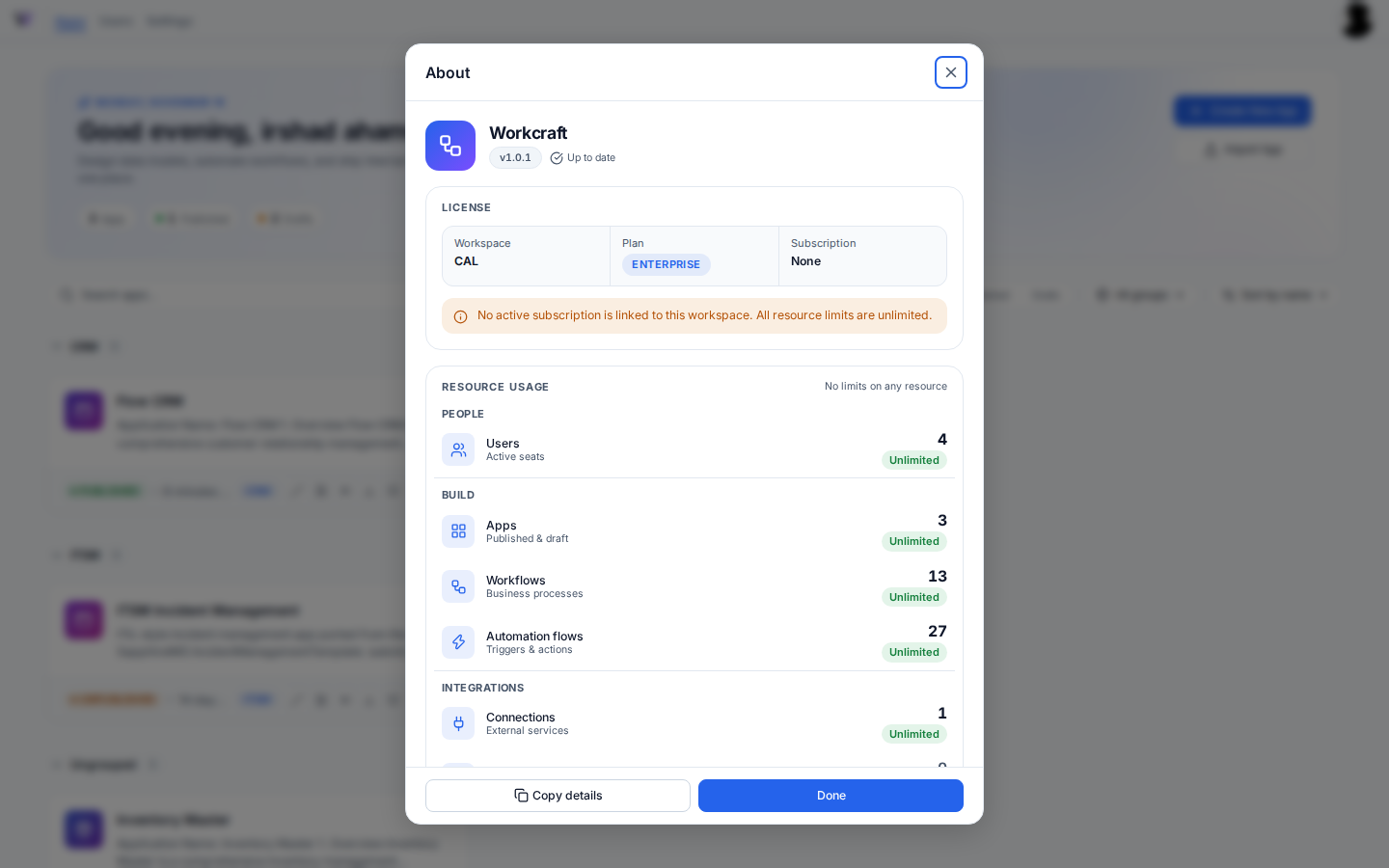
Tenant admins can also see live usage and the effective feature set in the tenant management area; the same usage and entitlement data is available to programmatic automation.
Trial and billing
New tenants get the deployment's default plan (configurable; often a trial window). Plan changes go through the tenant's subscription — Stripe customer/subscription IDs are tracked on the tenant record. Contact your Workcraft admin or support to change plans.