Docs
HTML pages
Custom pages with live data: the JavaScript bridge, embedded pages, the design system, and patterns for home, detail and dashboard pages.
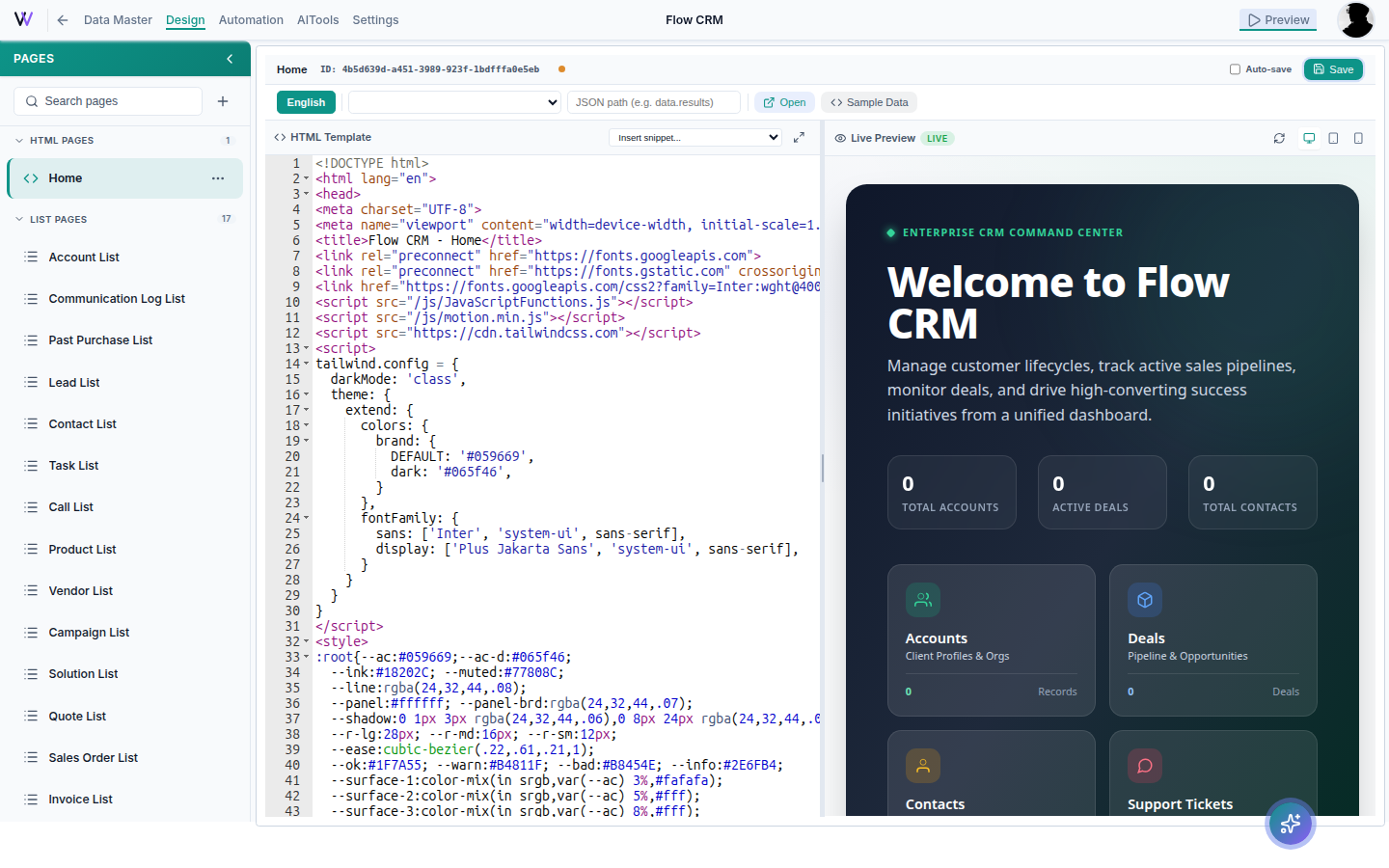
HTML pages are fully custom pages inside your app — landing pages, dashboards, detail views, reports — that still read and write live app data. They run in a sandboxed frame and talk to the platform through a small JavaScript bridge. This page covers the bridge, the rules pages must follow, and the standard patterns.
The JavaScript bridge
Inside an HTML page, parent is the Workcraft window. Load the platform helper once and the same functions are available as local aliases:
<script src="/js/JavaScriptFunctions.js"></script>| Function | What it does |
|---|---|
parent.openPage(pageId) | Navigates to any page by its ID — buttons, cards and links all use this. |
parent.fetchRecords(formName, options) | Paginated records from a form's data store. formName is the form's storage name (page name without spaces, e.g. OrderForm). Options: page, size, sort. |
parent.countRecords(formName) | Record count — the cheap way to fill KPI cards. |
parent.fetchRecordById(documentId) | One record, fetched flat — fields are read directly (record.customer_name, not record.formData.…). |
parent.openEditForm(formData, formPageId) | Opens a form pre-filled for editing. |
parent.openPageModal(pageId, options) | Opens a real built page (form, list…) in a modal. Options: title, mode: 'create'|'edit', documentId, record, width, prefill. |
parent.closePageModal() | Closes the modal opened by openPageModal — use from inside the embedded page when a custom submit button finishes. |
parent.formatDate(value, format) | Formats a date value using the app's locale settings. |
parent.location | The shell window's location object (read navigation state). |
parent.invokeFlow(flowId, params) | Runs an automation flow and returns its output. |
parent.getEntityHistory(dataStoreId, workflowId) | Audit trail for a record (field changes + workflow events). |
parent.getUserDetails(userId) | User profile lookup. |
parent.getAppTheme() | The app's accent palette — use it instead of hard-coding colors. |
parent.refreshData() | Asks the shell to re-render the page. |
localStorage keys (read-only)
documentId— the record a list View action opened (detail pages).htmlPageData— the full list row the user clicked.formData— field values when arriving from a form.
Embedding built pages
You rarely need to hand-build forms inside HTML. Embed the real Form/List page instead — it keeps its own Save button and validation:
<iframe src="/embed/PAGE_UUID?mode=create" style="width:100%;height:640px;border:0"></iframe>Add &mode=edit&documentId=RECORD_ID to edit a record, or open the same URL in a modal via parent.openPageModal. To pre-fill a new record from the current one, pass prefill: { field: value } — ideal for "Add line item" buttons that link back to the parent record.
Design rules every page must follow
- Self-contained document. One
<!DOCTYPE html>page with inline CSS/JS. No external UI frameworks, no Tailwind/Chart.js/icon fonts/jQuery — inline SVG icons only. - Design tokens. Colors, radii, shadows, spacing and fonts come from CSS variables (
var(--ac)accent,var(--ink)text,var(--panel)surfaces…). Never hard-code hex colors in component rules — the app theme and dark mode adapt automatically. - Dark mode is automatic. The shell mirrors the theme into the page; read
document.documentElement.classList.contains('dark-mode')only if your JS paints colors itself. - Live numbers only. Every user-visible count or row comes from
fetchRecords/countRecords— render a placeholder first, never hard-code figures. - States are mandatory. Skeleton/loading rows while fetching, an empty state with a primary action on zero rows, an error note on failure. Never an empty table.
- Accessible. Labels on every control, visible focus rings, WCAG AA text contrast, no horizontal page scroll at narrow widths (wide tables scroll inside their own container).
Motion
The platform ships motion.dev as a same-origin script — the only external library allowed:
<script src="/js/motion.min.js"></script>Use the global Motion for entry animations (fade + rise), staggered card grids, scroll-triggered panels, count-up numbers and press feedback. House values: 0.3–0.5s, easeOut, stagger 0.03–0.08s. Always guard with prefers-reduced-motion and never pre-hide content waiting for JS — the page must stay readable if the script fails.
Standard page patterns
Home / landing page
The app's front door: a hero with the app name and live stats, a grid of module cards (one per entity, each navigating to its list), KPI cards from countRecords, and a "recent records" table from fetchRecords sorted by created date.
Custom detail page
For single-record layouts that a standard record view can't express. Read documentId from localStorage, fetchRecordById, show a skeleton, then fill field groups. Sticky action bar with an Edit button (openEditForm) and status chip — no Back button, the shell provides one. Related child records belong in a panel with an "Add …" button that calls openPageModal(childFormId, { mode:'create', prefill: { fk: record.parent_key } }).
Note: the standard
<Entity> Detailspage is a built-in record view type, not HTML — see Page builders. Reach for a custom HTML detail page only when you need a branded, non-standard layout.
Dashboard
Data-first: KPI row on top, then panels with hand-drawn inline-SVG charts (sparklines, bars, donuts) computed from fetchRecords results. For most dashboards prefer the built-in dashboard page type with counter/chart/table widgets — see Page builders.
Filtered / grouped views
A custom table over fetchRecords with filter controls that re-query, sortable headers, and pagination via { page, size }. Row click stores documentId and calls openPage(detailPageId).
Tables — required behaviors
Every record table ships: sticky header, click-to-sort headers, pagination past ~25 rows, optional row-selection checkboxes for bulk actions, skeleton/empty/error states. Keep tables inside a horizontally scrolling wrapper so the page never scrolls sideways.
Anti-patterns — never do these
| Don't | Do instead |
|---|---|
history.back() or window.location.href | parent.openPage(pageId) |
| Hard-coded counts ("120 orders") | countRecords/fetchRecords, show -- first |
| Fabricated rows | Real fetch + empty state |
record.formData.field | record.field — the bridge returns flat data |
alert()/confirm() | Inline toast / modal markup |
| Emoji or icon-font icons | Inline SVG |
| Hand-built POST forms to the API | Embed the built Form page or openPageModal |
| Any CDN script (GSAP, Tailwind, Chart.js) | Token CSS + /js/motion.min.js only |
| Leaving page-name placeholders in output | Always substitute real page UUIDs |