Blog · 2026-11-25
Firebase Studio Is Sunsetting — Where Do the Apps Go?
Google is sunsetting Firebase Studio — the internal-tools crowd is the group the migration guide doesn't address. An honest look at the rebuild path.
On March 19, 2026, Google announced it is sunsetting Firebase Studio. The timeline, from Google's own documentation:
- June 22, 2026 — new workspace creation and new user signup disabled (already in effect).
- March 22, 2027 — Firebase Studio itself goes read-only history; workspaces must be migrated before that date.
As of today that's roughly four months of runway. Google's official guidance steers existing users toward two destinations: Google AI Studio for prompt-to-app prototyping with Firestore and Authentication wired in, and Google Antigravity for developers who want a code-first agentic IDE. Core Firebase services — Firestore, Authentication, App Hosting — keep running; deployed apps don't die. What dies is the environment you built them in.
If you're a developer who treated Studio as a fast IDE, Antigravity is a reasonable home. If you were vibe-coding prototypes, AI Studio picks up where you left off. This post is for the third group — the one Google's migration guide doesn't really address.
The orphaned use case: business apps, not prototypes
A lot of Firebase Studio workspaces weren't prototypes or developer scratch pads. They were internal tools — an approvals tracker for ops, a partner onboarding portal, a lightweight CRM someone built because the ticket queue for IT was six months long. The person who built it described the app in prompts, iterated until it worked, and shipped it to ten or fifty colleagues.
That use case lands awkwardly in Google's two exits:
- AI Studio is a prototyping surface. It generates an app with a Firebase backend — but when the app needs end-user roles (managers approve, staff submit), per-department data isolation, or audit trails, you're back to writing code.
- Antigravity is an agentic IDE. Powerful, but it assumes the person maintaining the app is — or wants to become — a developer. The ops lead who built the approvals tracker usually isn't and doesn't.
The gap isn't generation. Every serious tool generates apps now. The gap is everything after: who can sign in, what each user is allowed to do, how changes get reviewed and rolled back, where the data lives, and whether the whole thing is metered per API call.
What Workcraft gives a generated app that Studio didn't
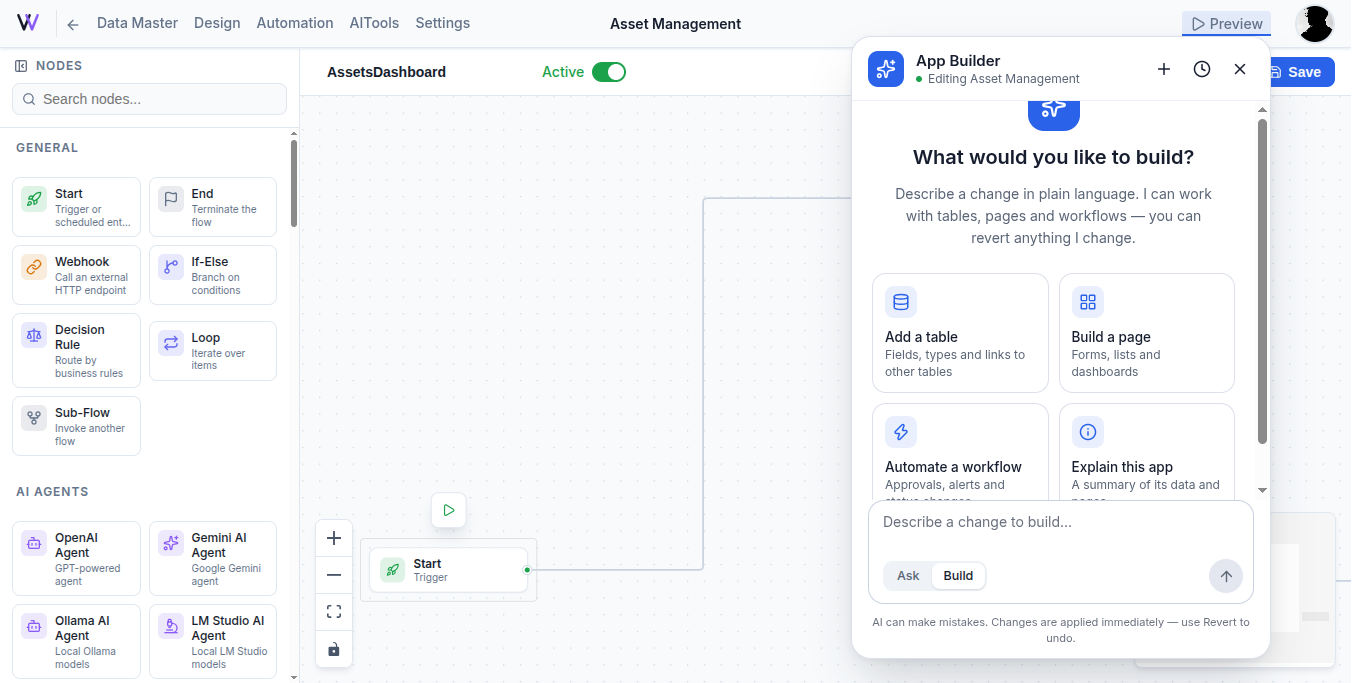
Workcraft's starting point is the same sentence-to-app gesture: describe the application, and the platform's staged AI pipeline generates the pages, data sources, roles, and navigation. What differs is what the generated app lands inside — a multi-tenant application platform, not a workspace around a code folder.
Concretely, for the internal-tool use case:
- End users and roles are platform concepts, not code you maintain. Every generated app gets Workcraft's user model: per-app role definitions, app assignments, password policy and MFA at the workspace level, optional per-tenant Google/Microsoft OAuth — and OIDC/SAML/SCIM on Enterprise. "Managers approve, staff submit" is a role configuration, not an auth system you build.
- Automation is drawn, not scripted. The flow designer's node palette covers AI calls, integrations, communication, logic, and data operations. The approval email, the Slack notification, the nightly sync — these are nodes on a canvas that non-developers can read and edit.
- Data connects to what you already have. Generated apps can sit on MongoDB, MySQL, PostgreSQL, SQL Server, REST APIs, Google Sheets, or Airtable — so "keep using the data we already have" is a supported posture, not a migration project.
- Changes are versioned and reversible. Workcraft versions apps Git-style — branches, diffs, restores — plus environments for staging-to-production promotion. When a generated change breaks something, you roll back instead of re-prompting and hoping.
- Audit and governance exist because enterprises need them. On Pro and above: audit logs, environments, versioning — the features that make an internal tool approvable by a security review rather than a shadow-IT liability.
- Hosting is your call. Workcraft runs as managed multi-tenant cloud, or self-hosted on request — in your own region or infrastructure. For teams leaving Studio partly because a vendor sunset their tool, "the platform can run where we control it" is not a small thing.
- Pricing is plan-based with published limits — users, apps, workflows, and AI generations per month — rather than per-request or per-token metering that scales with your app's success in ways you can't forecast.
An honest word about migration
There is no Firebase Studio importer, and we won't pretend otherwise. Studio projects are code; Workcraft apps are platform-managed applications. The realistic path for an internal tool:
- Export your Studio project (zip download or GitHub export — Google documents both).
- Inventory what it actually does: the screens, the data entities, who uses it and what each of them is allowed to do, the automations wired around it.
- Describe the app to Workcraft's generator — the inventory above is exactly the input the generation pipeline wants. The regeneration usually lands in hours, not the weeks the original build took, because you're describing a known target rather than discovering one.
- Reconnect data: point the app's data sources at your existing backend — the REST data source covers external APIs, and native connectors cover the common databases and sheets.
- Configure roles and flows, then promote through environments to production.
The code export isn't wasted — it's your specification. But the honest framing is rebuild on a platform, not migrate a codebase. For internal tools that's usually a feature: the Studio codebase was generated scaffolding anyway, and what you're really preserving is the app's behavior.
Who should actually look
Workcraft fits if your Studio workspace was an app people use — internal tools, portals, forms-and-approval flows, departmental dashboards — and you need it governed, versioned, and still running in 2028 without becoming a maintenance burden for a developer you don't have.
It doesn't fit if your workspace was a mobile app, a game, or a developer project that should genuinely live as code — that belongs in Antigravity or another IDE. And if you only ever prototyped, AI Studio already solved your problem.
The sunset clock runs to March 22, 2027. Google gave everyone time; the only real mistake is spending it deciding later.
What this doesn't cover yet
- No direct importer exists. The "migration" framing is rebuild-and-govern, stated plainly above. If a Studio/GitHub import path ships later, this post gets a follow-up.
- Firebase Auth → Workcraft SSO mapping is unverified. Tenants can wire their own OAuth/OIDC providers, but a one-click "keep my existing Firebase users signed in" path is not claimed.
- Firestore data migration is not covered. Workcraft's REST data source can reach external APIs, but a tested recipe for mounting a Firestore collection as a live Workcraft data source doesn't exist yet — that's a docs candidate, not a shipped claim.
- The four-month urgency is real but should not be oversold. Deployed Firebase apps keep running past the sunset; what ends is the Studio environment.
- Unverified: whether the generation pipeline handles a dense, detailed spec (the "inventory" in step 2) better than a one-line prompt — intuitive, but not benchmarked.
Sources
- Firebase Studio sunset & migration doc
- Firebase Studio release notes (Jun 22 / Mar 19, 2026 entries)
- Firebase blog announcement, Mar 19, 2026
Rebuilding an internal tool? Get a demo workspace or read the AI app generation docs.
Want to try it? Get a demo workspace or read the docs.